
Discord just dropped a bombshell that’s got millions of users asking the same question: “Do I really need to verify my age now?” The short answer? If you want to keep using Discord the way you always have, yes. But don’t worry, we’ve got everything you need to know right here.
Starting in early March 2026, Discord is rolling out what they’re calling a “teen-by-default” experience across the globe. What does that mean for you? Well, unless you verify that you’re an adult, you’re going to be treated like a teenager on the platform, whether you’re 15 or 50.
Why Discord is Suddenly Asking for Age Verification
Discord isn’t doing this just to annoy you (though it might feel that way). They’re trying to make the platform safer, especially for younger users. The idea is simple: if you don’t prove you’re an adult, Discord assumes you’re a teen and limits what you can see and do.
Think of it like an online club with different rooms. Right now, Discord is essentially letting everyone into the “adult” section by default. Starting March 2026, they’re flipping the script, you’ll start in the “teen” section unless you show your ID at the door.
What Happens If You Don’t Verify Your Age
So you’re thinking about skipping the whole verification thing? Here’s what you’re signing up for:
- All mature and graphic images will be permanently blurred
- Age-restricted channels and servers become completely inaccessible
- Direct messages from people you don’t know get rerouted to a separate inbox
- You can’t speak on server stage channels
Basically, your Discord experience gets a lot more limited. If you’re just there to chat with a few friends, you might not care. But if you’re active in various communities or use Discord for gaming, work, or hobbies, these restrictions will get old fast.
How to Complete Discord Age Verification: Your Two Options
Discord gives you two ways to prove you’re an adult. Both work, but they’re pretty different in how they handle your privacy.
Option 1: The Video Selfie (Facial Age Estimation)
This is the faster, more private option. Here’s how it works: you record a quick video selfie right on your device, and Discord’s technology analyzes it to estimate your age. The cool part? That video never actually leaves your device. It’s processed locally, so Discord never stores or sees your face.
Think of it like those filters on Instagram that guess your age, except this one is used to unlock Discord features instead of giving you virtual wrinkles.
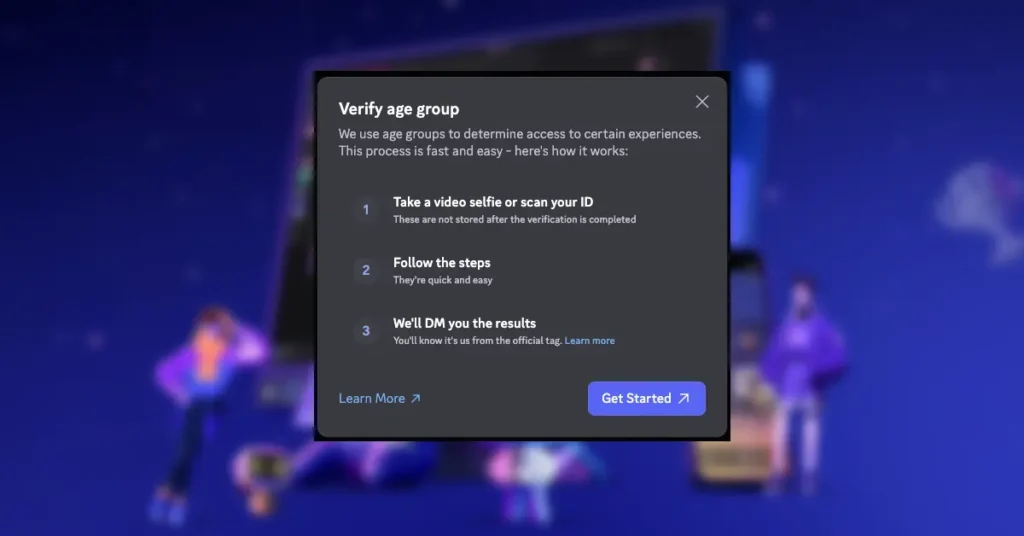
The Process:
- Open Discord and wait for the age verification prompt (or trigger it by trying to access restricted content)
- Select the video selfie option
- Follow the on-screen instructions to record a brief video
- Wait a few seconds for the analysis
- You’re done!
According to Discord, their facial age estimation system is sophisticated enough to verify most adult users automatically. So if you look your age (or older), this should be smooth sailing.
Option 2: Government ID Verification
If the video selfie doesn’t work or if you’d rather use a traditional method, you can verify with a government-issued ID. This is more involved and requires you to share a bit more information.
What You’ll Need:
- A government-issued ID (driver’s license, passport, state ID)
- A smartphone or webcam to take photos
- A matching selfie for identity confirmation
The Process:
- Choose the ID verification option when prompted
- Take a photo of your government-issued ID
- Take a selfie to confirm it’s really you
- Submit and wait for verification (usually happens quickly)
Discord partners with a company called k-ID to handle this process. The good news? Your ID documents are deleted fast, in most cases, immediately after they confirm your age. Discord doesn’t keep them sitting around in some database.
When Will You Be Asked to Verify?
Discord won’t just randomly interrupt your conversations demanding proof of age. Instead, the verification prompt pops up when you try to do specific things:
- Unblurring sensitive or mature content
- Changing your Sensitive Media Filter settings
- Modifying Message Request settings
- Trying to join age-restricted channels or servers
- Attempting to speak on stage channels
The smart move? Get verified early. That way, you won’t hit a wall right when you’re trying to check out that hilarious meme someone sent you.
Privacy Concerns and What Discord Does With Your Data
Let’s address the elephant in the room: is this safe? Here’s what you should know.
For the video selfie method, your video is processed entirely on your device. Discord’s servers never see or store your face. It’s about as private as age verification can get.
For ID verification, Discord works with k-ID, a third-party service that specializes in this stuff. Your documents are deleted quickly, usually right after they verify your age. Discord only receives confirmation that you’re an adult, not copies of your ID.
One thing Discord is clear about: your age verification status is private. Other users can’t see whether you’ve verified or not. It’s not like a badge on your profile or anything.
What People Are Saying: The Community Reaction
When Discord first announced this change, the internet did what it does best: freaked out. There was a lot of concern about privacy, data security, and whether Discord was overstepping.
The backlash got loud enough that Discord made some changes. Originally, it seemed like everyone might need to manually verify. After listening to feedback, Discord clarified that their facial age estimation technology would handle verification automatically for most adult users. Manual verification (either by video selfie or ID) would only be needed if the automated system couldn’t confirm your age.
It’s a reminder that companies do listen when users speak up though whether this is enough to address all privacy concerns is still up for debate.
Tips for a Smooth Verification Experience
Want to make this as painless as possible? Here are some tips:
- Try the video selfie first. It’s faster and more private.
- Make sure you have good lighting if you’re doing the video selfie, it helps the system read your face better.
- If you’re using ID verification, have a clear, recent photo of your ID ready.
- Don’t wear sunglasses, hats, or anything that obscures your face during verification.
- Double-check that your ID isn’t expired, Discord’s partner system won’t accept expired documents.
The whole process should only take a few minutes. It’s one of those “rip the band-aid off” situations, get it done, and you won’t have to think about it again.
Frequently Asked Questions
Do I have to verify my age on Discord?
Is my data safe with Discord?
Can other users see that I’ve verified my age?
What if the video selfie doesn’t work?
How long does verification take?
The Bottom Line
Discord’s new age verification system is here to stay. While the initial announcement caused some panic, the reality is less dramatic than many feared. Most adult users will be verified automatically through facial age estimation, and for those who need to manually verify, the process is quick and relatively painless.
Is it perfect? No. There are legitimate privacy concerns, and some people will understandably be uncomfortable sharing biometric data or ID photos. But Discord has made efforts to address these concerns through on-device processing and quick data deletion.
At the end of the day, if you want the full Discord experience, unblurred content, access to all servers, and unrestricted messaging, you’ll need to verify. The good news is that it only takes a few minutes, and you’ll never have to do it again.
Ready to Verify Your Age?
Don’t wait until you’re trying to access restricted content and get hit with a verification wall. Take five minutes today to complete the process. Whether you choose the video selfie or ID verification, you’ll be done before you know it, and you won’t have to worry about limited features holding you back.
Open Discord, look for the age verification prompt, and get it done. Your future self (who wants to see that funny meme your friend just sent) will thank you.
Still have questions about Discord’s age verification? Drop a comment below or check out Discord’s official support page for more details. And if you found this guide helpful, share it with your friends who might be wondering what all the fuss is about!