Code Vein 2 comes with a deep and flexible character creator, giving players plenty of sliders, presets, and fine-tuning options. On paper, it sounds perfect. In reality, it also creates a small problem.
You can easily spend a long time building your character at the start of the game, adjusting facial features, hairstyles, and proportions. But all of that happens in isolation. Until you actually step into the game world and take control, you won’t truly know how your character looks in motion, under real lighting, or during combat.
If you’re worried you might regret your early design choices, don’t stress. The game does allow you to change your character’s appearance later. You just need to reach the right point first. Below is a clear, step-by-step breakdown of how appearance changes work in Code Vein 2 and when you can access them.
Changing Your Appearance in Code Vein 2
The good news is that you are not locked into your initial character design. You can fully adjust how your character looks, and there are no strict limits once the feature is unlocked.
The only catch is that this option is not available immediately.
At the start of the game, you’ll need to play through the tutorial as intended. Follow the main questline that has you working alongside Noah as you search for Valentin. This early section also guides you through basic mechanics and introduces the world before eventually leading you to MagMell.
Once you reach MagMell, you are very close to unlocking the appearance change feature.

Where to Go in MagMell
After arriving in MagMell, look for the Mistle. From there, you’ll want to take the door located right next to it. This door leads into the next area and is hard to miss once you know where to look.
Go through the door and head up the stairs in the next room. The path here is straightforward, and there are no alternate routes to confuse you. Continue forward until you find another door. Since it’s the only door along this path, you can’t go the wrong way.
Head inside and go down the stairs. At the bottom, you’ll see a strange curtain marked with a symbol. This is your cue that you’re in the right place.
Pass through the curtain.
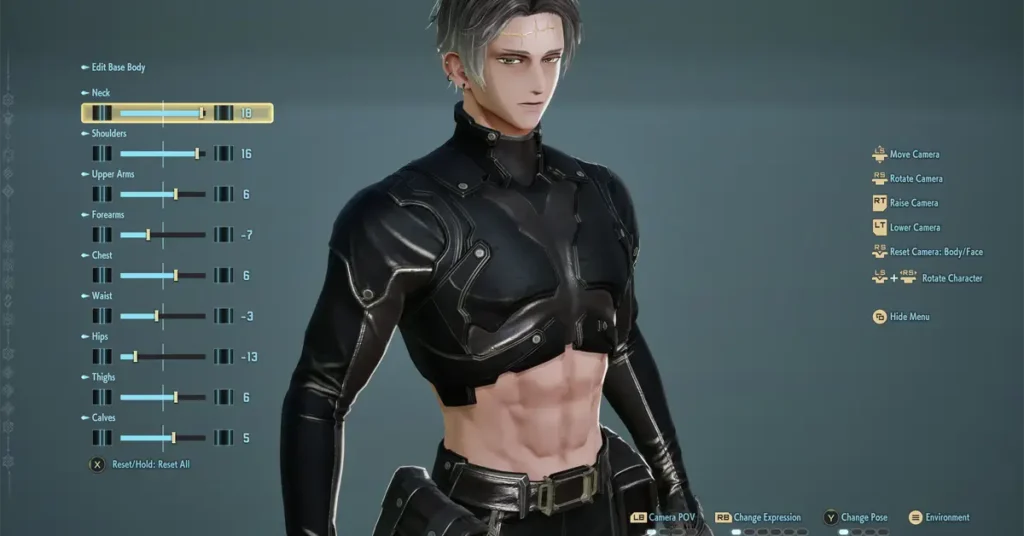
The Appearance Adjustment Room
Beyond the curtain is a dedicated changing area. Inside, you’ll find three vanities and two sinks, each equipped with mirrors. Any one of these can be used to adjust your character’s appearance.
Interacting with these stations opens the appearance editor, letting you tweak your character just like you did during initial creation. This includes fine adjustments, allowing you to correct anything that didn’t look quite right once you saw your character in action.
This room also serves another purpose. It acts as a preparation area before reaching the hot spring located beyond it. The hot spring is worth using, as it is how you unlock new synthesis recipes. While it’s separate from appearance customization, it’s a good reminder not to rush through this area.
A Crucial Tip Before You Edit Anything
Before you start changing sliders or experimenting with new looks, there is one important step you should always take.
When you open the appearance editor, scroll to the final set of options and select Save/Delete Appearance Data. Doing this saves your current character design exactly as it is.
This step is extremely useful. If you push a slider too far, forget your original settings, or simply decide that you don’t like your new look, you can revert back to the saved version without any frustration. It’s a simple precaution that can save you a lot of time and annoyance.
Once your appearance data is saved, feel free to experiment. You can make subtle changes or completely redesign your character without worrying about losing your original setup.
No Limits on Customization
Once unlocked, appearance changes are not restricted. You’re free to return to this area and adjust your character whenever you want. That flexibility makes the initial pressure of character creation much easier to handle.
If your character looks different than expected under new armor, lighting, or animations, you can always come back and fine-tune things. This is especially helpful as you progress and spend more time seeing your character from different angles during gameplay.
Final Thoughts
Code Vein 2 understands that first impressions don’t always match reality. While the character creator is powerful, it’s hard to predict how everything will look once the game truly begins. Thankfully, the ability to change your appearance later ensures you’re never stuck with a design you don’t love.
Just remember to play through the tutorial, reach MagMell, and find the changing room beyond the symbolic curtain. Save your appearance data before making edits, and you’ll always have a safe fallback.
Stay with us for more helpful guides, tips, and walkthroughs to make your journey through Code Vein 2 smoother and more enjoyable. If this guide helped you, don’t forget to check out our other coverage and share it with fellow players diving into the game.