

A sharp spike in outage reports hit players worldwide today. Login failures, stuck launchers, and matchmaking errors dominated the wave – here’s what happened and what to do if you’re still affected.
Fortnite players across the globe suddenly lost access to the game earlier today, with outage tracking data registering a spike of nearly 2,000 complaints in a compressed window – a level of volume that rules out a simple local glitch and points squarely at a core service failure.

Where players got stuck
Outage data paints a consistent picture. The bulk of complaints cluster around the earliest stages of the session – before a match even loads – suggesting Fortnite’s login and authentication layer bore the brunt of the incident.
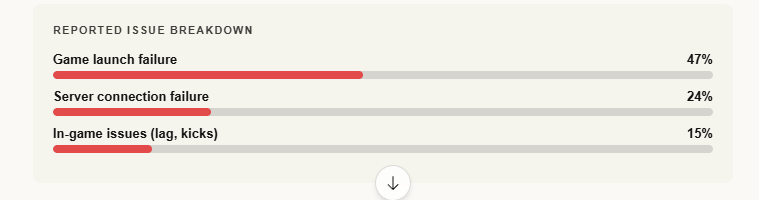
What players reported
Real-time comments during the spike told the same story repeatedly: failed logins, matchmaking loops that went nowhere, and games that simply refused to open. A subset of frustrated players went as far as uninstalling or switching devices – reflecting how complete the disruption felt.
The pattern of complaints was consistent across regions and platforms, confirming this was a backend issue rather than an isolated local fault.
What likely caused it
Epic Games has not publicly confirmed the root cause. But the timing lines up with a familiar scenario: the ongoing Chapter 7 Season 2 update will have driven a surge of returning players, placing elevated demand on login and session services. A temporary backend failure affecting authentication infrastructure is also consistent with the symptoms observed.
Current status
The complaint spike dropped quickly after reaching its peak – the classic signature of a stabilized incident rather than a prolonged outage. Most players should now be able to log in and queue normally. Epic has not issued a formal postmortem at time of publication.
Still can’t connect? Try this
- Restart the game and the Epic Games Launcher fully – force-quit both before relaunching.
- Log out and back in to refresh your session token.
- Switch your server region in settings – sometimes a single region remains degraded after a broader recovery.
- Test on a mobile hotspot to isolate whether the issue is your home network.
Still experiencing issues? Drop a comment – community reports help others track recovery in real time.