

When Xbox first announced support for keyboard and mouse, people were split. Some thought it was a gimmick, others were excited to finally play shooters without fighting the thumbsticks. Now in 2025, the feature has grown a lot.
Plenty of big titles officially support it, and for certain genres it makes a world of difference. If you’ve been wondering which games are worth playing with a keyboard and mouse on Xbox, this guide will walk you through the best ones, how to set things up, and a few tips to make the most of it.
Why Bother with Keyboard and Mouse on Xbox?
Let’s be honest, controllers are great for most games, but they have limits. Aiming with sticks can feel clunky compared to a mouse. Managing inventories in RPGs or survival games is slower than it needs to be. And trying to play a real-time strategy game with a controller often feels like wrestling the controls instead of commanding an army.
Keyboard and mouse fix a lot of that. The mouse gives smoother aim, the keyboard gives you hotkeys and shortcuts, and for people who grew up gaming on PC it just feels more natural. The best part is that Xbox makes it simple, plug your gear in, launch a supported game, and you’re good to go.
Quick Setup Tips
Getting started doesn’t take long. If you’ve got a wired keyboard and mouse, just plug them into the USB ports on your Xbox. Wireless sets that use a dongle usually work fine too. Standard Bluetooth ones don’t, so don’t waste time trying to pair them.
Once connected, you can tweak a few settings. Go to Settings > Devices & connections > Mouse to adjust sensitivity or confirm the console detects your gear. Most games will switch over automatically once they see you’re using a keyboard and mouse, but a few will make you select it manually in the options menu.
Pro tip: always keep a controller nearby. Some games only support KBM in gameplay, not in menus, so you’ll want both handy.
The Best Xbox Games with Keyboard and Mouse Support

Here’s the part you came for – the games that actually make KBM worth it on Xbox.
Halo Infinite
Halo Infinite plays great with a mouse. Aiming feels crisp, movement is tighter, and multiplayer separates players by input in ranked modes so things stay fair. If you love Halo but always felt limited by a controller, this is the one to try.
Call of Duty (MWII, MWIII, Warzone)
Call of Duty has always been PC-friendly, so it’s no surprise the Xbox versions support KBM too. You can customize keybinds, adjust sensitivity, and play exactly like you would on PC. The quick time-to-kill in COD makes mouse accuracy a huge plus.
Fortnite
Fortnite was one of the first console games to embrace KBM, and it shows. Everything from building to aiming just feels faster. The controls are nearly identical to PC, which is handy since you’ll often run into PC players in crossplay matches.
Minecraft (Bedrock Edition)
Typing in chat, sorting through stacks of items, or building detailed structures is just easier with a keyboard. The mouse also makes block placement smoother. For creative players, this setup is far less frustrating than using a controller.
Age of Empires IV
Strategy games almost never work well with controllers. Age of Empires IV is a rare exception because Xbox lets you use keyboard and mouse. You get hotkeys, quick commands, and the same control scheme as the PC version. It’s the best way to play an RTS on console, no question.
Gears 5
Cover shooters aren’t usually the first genre you think of with KBM, but Gears 5 actually feels great. The mouse helps with headshots, and the keyboard makes weapon swaps and abilities smoother. Multiplayer is also input-based, which keeps things balanced.
Alan Wake 2
This one is more subtle. You don’t “need” KBM for Alan Wake 2, but the aiming is more comfortable with a mouse, and exploration feels snappier. For a single-player story game, having the option is nice, especially if you’re used to playing on PC.
Cyberpunk 2077
Night City is packed with menus, gear, and skill trees, and all of that is easier with a mouse and keyboard. Shooting also feels more responsive. The updates since launch added solid KBM support, so if you’re diving back in, give it a try this way.
Microsoft Flight Simulator
Not everyone owns a flight stick, so KBM is the next best thing. The mouse lets you click around the cockpit smoothly, while the keyboard covers commands. It’s not perfect, but it’s much better than trying to control everything with just a controller.
Other ports and sims
Games that started on PC often bring KBM support with them when they land on Xbox. Keep an eye out for tactical shooters, survival sims, and competitive arena games, since many of them already support it.
Matchmaking and Fairness
One big question players have is whether using Keyboard and Mouse is an advantage. In some ways it is, but developers have worked around it. Many multiplayer games use input-based matchmaking, meaning KBM players fight other KBM players. Halo Infinite does this in ranked. Call of Duty lets you adjust crossplay settings if you want more control over who you’re matched with.
So while there are differences, most of the time you won’t be tossed into a lobby full of controller players unless the game allows mixed input.
Troubleshooting if things don’t work
- If nothing happens when you plug in your gear, try a different USB port.
- Restart the console with the devices connected.
- For wireless, check the dongle or replace the batteries.
- If menus aren’t working with KBM, that’s normal in some games – keep a controller close by.
- Check in-game settings to make sure the preferred input is set correctly.
A Word on Adapters
Yes, there are adapters that let you use Keyboard and Mouse even in games without official support. They basically trick the Xbox into thinking your keyboard is a controller. They can work, but use them at your own risk. Some games consider them cheating, and you might run into problems in competitive modes. It’s always safer to stick to games that support KBM natively.
Picking The Right Gear
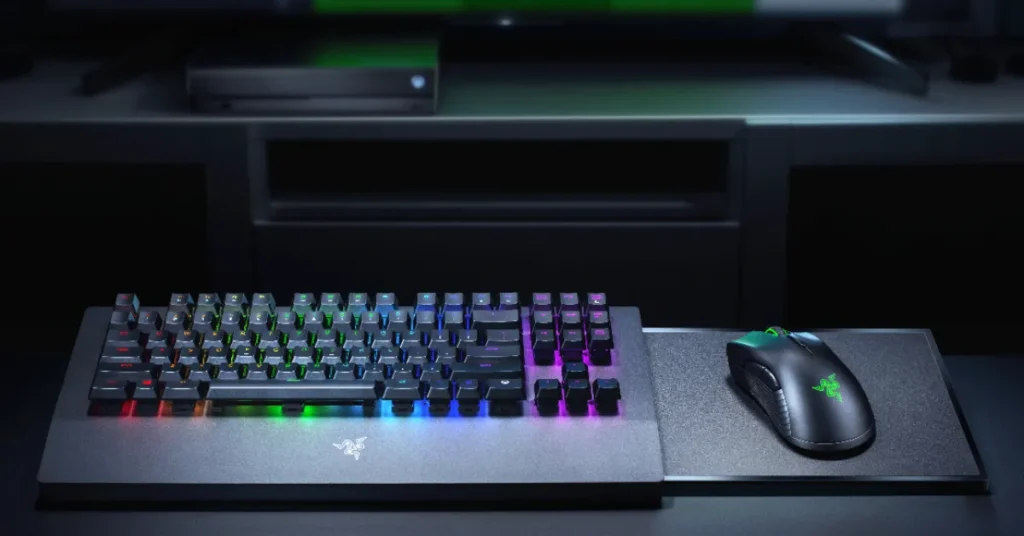
If you’re gaming at a desk, your usual setup works fine. But if you’re on the couch, balancing a mouse on the armrest gets old fast. That’s where lapboards or compact wireless sets come in handy. Something like the Razer Turret is designed specifically for living room setups and can make the experience much smoother.
The main thing is comfort. You don’t want your gear sliding around while you’re trying to focus on a match.
Final Thoughts
Keyboard and mouse on Xbox is no longer just a novelty. In 2025, it’s a real option for shooters, strategy games, and sims. Some games are simply better this way, like Age of Empires IV, while others like Halo Infinite and Call of Duty give you the precision you’ve always wanted on console.
The list of supported games keeps growing, so it’s worth checking the Microsoft Store for the “keyboard and mouse” tag whenever you’re shopping around. Even if you’re not a competitive player, it’s nice to have the choice. Some nights you’ll kick back with a controller, other nights you’ll slide a mouse across the desk and jump into a shooter. Having both options makes Xbox more flexible than ever.