
If you are building a new gaming setup for GTA 6, a good wireless mouse probably is not the first thing on your list. But if you plan to play GTA 6 on PC whenever that version eventually arrives, choosing the right mouse now can save you from having to upgrade later.
There is one big catch, though. Rockstar currently lists GTA 6 for PS5 and Xbox Series X|S, with a November 19, 2026 release date. Rockstar has not announced a PC version yet.
So, you will not find an official “GTA 6 mouse” here. Instead, we are looking at wireless gaming mice that make sense for a future GTA 6 PC setup while still being excellent for the games you can play today.
After looking at the current wireless mouse market, these are the models we would put at the top of the list.
Best Wireless Gaming Mice for GTA 6
| Mouse | Best For | Approx. Weight |
|---|---|---|
| Razer Viper V4 Pro | Best overall | 48.9g |
| Logitech G PRO X2 SUPERSTRIKE | Best premium option | 60.8g |
| Logitech G502 X PLUS | Best for extra buttons | 100g+ |
| Razer Naga V2 Pro | Best for customization | 134g |
1. Razer Viper V4 Pro
Best wireless gaming mouse for GTA 6 overall

- 49G ULTRA LIGHTWEIGHT ESPORTS MOUSE — Built with input from competitive pro players, this wireless mouse is 9% lighter t…
- INDUSTRY LEADING SPEED & RELIABILITY — Powered by Razer HyperSpeed Wireless Gen-2, it delivers unrivaled speed and relia…
- OPTICAL SCROLL WHEEL FOR COMPETITIVE ACCURACY — Uses optical actuation instead of mechanical for more consistent trackin…
The Razer Viper V4 Pro is our top pick if you want one wireless mouse that can handle GTA 6 and pretty much everything else in your PC library.
The first thing you notice is the weight. At just 48.9 grams, the Viper V4 Pro is incredibly light. That makes it easy to move around your desk, which is particularly useful when you are playing shooters or spending hours moving the camera around in an open-world game.
Razer also packs in its Focus Pro 50K Optical Sensor Gen-3 and supports wireless polling rates of up to 8,000Hz. RTINGS currently highlights the mouse for its excellent sensor performance and low latency.
You probably will not need 8,000Hz polling for GTA 6. Still, it is nice to have the option if you also play competitive shooters.
Battery life is another strong point. Razer rates the mouse for up to 180 hours at 1,000Hz, although using higher polling rates will reduce that figure.
Why we like it
- Very lightweight 48.9g design
- Excellent optical sensor
- Up to 8,000Hz polling
- Optical switches
- Strong wireless performance
- Long battery life
- Works well for both shooters and open-world games
Best for: Most gamers
2. Logitech G PRO X2 SUPERSTRIKE
Best premium wireless gaming mouse
If price is not a major concern, the Logitech G PRO X2 SUPERSTRIKE is an impressive piece of gaming hardware.

- Designed With Pros, Engineered to Win: Designed alongside the world’s best esports athletes, the Logitech G PRO X2 SUPER…
- Dominate with industry-leading speed: 30 ms faster clicks for peak performance in every esports match and deep customiza…
- Haptic Feedback: This breakthrough haptic gaming mouse with Haptic Inductive Trigger System (HITS) gives real-time feedb…
This is a mouse designed with competitive players in mind. Logitech’s Haptic Inductive Trigger System, or HITS, allows players to customize the actuation of the main buttons. That is a feature you will appreciate more in a competitive shooter than in GTA 6, but it gives the mouse plenty of versatility.
The PRO X2 SUPERSTRIKE weighs around 60.8 grams and supports high-end wireless performance. Logitech lists it at $179.99 in the US.
That is a lot of money for a mouse, especially if you mainly play single-player games.
But if GTA 6 is going to share your PC with games like Call of Duty, Fortnite, Valorant, or Counter-Strike 2, the extra performance makes more sense.
Why we like it
- Lightweight design
- HITS click technology
- Adjustable actuation
- Excellent wireless performance
- Designed for competitive gaming
- Great sensor performance
- Premium build
Best for: Enthusiasts and competitive gamers
3. Logitech G502 X PLUS
Best wireless mouse for extra buttons
Not everyone wants a super-light mouse. Some players prefer something that feels solid in their hand, and that is where the Logitech G502 X PLUS comes in.
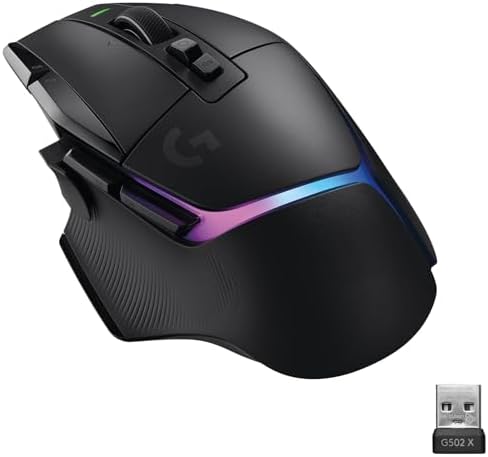
- A REFUNCED ICON: From the legacy of Logitech’s most popular G502 design, the G502 X PLUS has been reworked and redesigne…
- LIGHTFORCE Switch: Brand new hybrid optical-mechanical switch technology for incredible speed and reliability, as well a…
- LIGHTSYNC RGB: This mouse has glowing 8-LED lighting that adapts while gaming, with power-ups for setup/off and battery …
The G502 X PLUS is considerably heavier than the Viper V4 Pro, but it gives you something the Razer cannot: lots of additional controls.
It has a comfortable ergonomic shape and multiple programmable buttons that you can customize for different games.
That could come in handy in GTA 6. We do not know what the final PC control scheme will look like, but having extra buttons available could make it easier to map frequently used actions.
The G502 X PLUS also uses Logitech’s HERO 25K sensor and LIGHTSPEED wireless technology. Logitech advertises up to 130 hours of battery life with RGB lighting turned off.
Why we like it
- Lots of programmable controls
- Comfortable ergonomic design
- HERO 25K sensor
- LIGHTSPEED wireless
- Long battery life
- RGB lighting
- Excellent all-purpose gaming mouse
The tradeoff is weight. If you prefer quick, effortless mouse movements, the Viper V4 Pro is a much better fit.
Best for: Gamers who want extra controls
4. Razer Naga V2 Pro
Best wireless mouse for customization
The Razer Naga V2 Pro is probably the most specialized mouse on this list.

- ABSOLUTE ADAPTABILITY AND CONTROL — This mouse comes with a set of 12, 6 and 2-button magnetic side plates, allowing to …
- RAZER HYPERSCROLL PRO WHEEL — With adjustable tactility, resistance, and steps, create firmer, more distinct scrolls for…
- RAZER HYPERSPEED WIRELESS — With a connection 25% faster than any other wireless tech available, enjoy high-performance,…
Its biggest trick is the interchangeable side panels. You can change the button layout depending on the game, including a 12-button configuration designed for MMO players.
You almost certainly do not need 12 side buttons just to play GTA 6.
But if you jump between GTA, World of Warcraft, Final Fantasy XIV, Diablo, and other games with complicated control schemes, the Naga V2 Pro becomes much easier to recommend.
It also has excellent battery life and Razer’s HyperSpeed wireless technology.
The downside is weight. At around 134 grams, it is significantly heavier than the Viper V4 Pro.
Why we like it
- Interchangeable side panels
- Lots of programmable buttons
- Excellent customization
- Strong wireless performance
- Long battery life
- Great for MMOs and other button-heavy games
Best for: MMO players and customization fans
Which Wireless Mouse Should You Buy for GTA 6?
The answer really comes down to how you play.
Get the Razer Viper V4 Pro if…
You want the easiest recommendation. It is lightweight, fast, comfortable, and capable enough for practically any PC game.
It is also the mouse I would choose if GTA 6 is not the only game you care about.
Get the Logitech G PRO X2 SUPERSTRIKE if…
You want a premium mouse and regularly play competitive games.
Its advanced click system makes it more interesting for esports-style gaming, although you will not get much benefit from those features in a typical GTA session.
Get the Logitech G502 X PLUS if…
You prefer an ergonomic mouse with plenty of buttons.
It is heavier, but that is not necessarily a bad thing. Some players simply prefer a mouse with more weight and a larger shape.
Get the Razer Naga V2 Pro if…
You play MMOs or other games that need lots of buttons.
It is probably more mouse than you need for GTA 6, but it is incredibly flexible if you play a wide range of PC games.
What Should You Look for in a GTA 6 Gaming Mouse?
You do not need to buy the mouse with the highest DPI number or the most impressive specification sheet.
For GTA 6, some of the less exciting features could matter more.
Comfort
This should be near the top of your list.
GTA games are the kind of titles where you can easily lose track of time. If you are going to spend three or four hours playing, you want something that feels comfortable throughout the session.
Your grip also matters. A mouse that feels great with a palm grip might not feel nearly as good if you use a claw or fingertip grip.
Weight
There is no perfect mouse weight.
A lightweight mouse is easier to move and can feel much faster. A heavier mouse can feel more stable and substantial.
If you play a lot of FPS games, we would lean toward something lighter. If you mostly play slower-paced games, weight becomes much less important.
Wireless connection
A good gaming mouse should have a reliable wireless connection.
Most premium gaming mice use a dedicated 2.4GHz receiver for this reason. Bluetooth is convenient, but dedicated gaming wireless is generally the better option when you care about latency and consistency.
Battery life
Nobody wants to grab their mouse for a gaming session and discover that it needs to charge.
Look for a mouse that can comfortably last several sessions between charges.
Programmable buttons
Extra buttons can be useful, but more is not always better.
For most players, two or four side buttons are plenty. If you regularly play MMOs, however, a mouse like the Naga V2 Pro can be a completely different experience.
Do You Need an 8,000Hz Mouse for GTA 6?
Probably not. An 8,000Hz polling rate sounds impressive, and it can reduce the time between mouse reports. However, the difference is much easier to notice in competitive games than in a cinematic open-world game.
For GTA 6, I would worry more about comfort, sensor quality, wireless stability, and battery life.
If your mouse supports 8,000Hz, great. You can experiment with it when you want.
Just do not spend extra money on a mouse solely because it has a higher polling rate.
Wireless vs. Wired for GTA 6
For most PC gamers, wireless is the way to go.
Modern gaming mice can offer excellent responsiveness without forcing you to deal with a cable dragging across your desk.
A wired mouse still has advantages. You never have to charge it, and you can often get similar performance for less money.
But if you are putting together a premium gaming setup, a good wireless mouse is a worthwhile upgrade.
Can You Use a Mouse and Keyboard With GTA 6?
That is still an unanswered question for PC players.
As of September 2026, Rockstar’s official GTA 6 information lists PS5 and Xbox Series X|S. There is no official PC version or mouse-and-keyboard control scheme to point to yet.
That means you should be careful with articles or social posts claiming to know the exact GTA 6 PC requirements or controls. Unless Rockstar confirms the information, it is speculation.
Should You Buy a Wireless Mouse Before GTA 6?
If you already need a new mouse, there is no reason to wait.
The mice on this list are not GTA 6-specific products. You can use them with your current games, and they should remain useful for years.
If GTA 6 is literally the only reason you are shopping for a new mouse, though, waiting is a perfectly reasonable option.
Rockstar has not announced the PC version yet. Until that happens, there is no need to rush out and buy hardware based solely on GTA 6.
Best Wireless Gaming Mouse for GTA 6: Final Verdict
For most gamers, the Razer Viper V4 Pro is the best wireless gaming mouse to pair with a future GTA 6 PC setup.
It is extremely light, tracks accurately, has excellent wireless performance, and offers enough battery life that charging should not become a regular annoyance.
The Logitech G PRO X2 SUPERSTRIKE is the better choice if you want something more premium and spend a lot of time playing competitive games.
If you want a mouse with plenty of buttons, go with the Logitech G502 X PLUS. And if customization is your priority, the Razer Naga V2 Pro is hard to ignore.
Just keep one thing in mind: GTA 6 is not confirmed for PC yet.
So instead of buying a mouse solely because you think it will be “perfect” for GTA 6, choose one that you will enjoy using right now. If Rockstar eventually brings GTA 6 to PC, you will already have a capable mouse sitting on your desk.
Want more GTA 6 news, guides, hardware recommendations, and gaming updates?
Follow GamerUrge for the latest gaming news, gaming guides, reviews, and tips. We will keep updating our GTA 6 coverage as Rockstar reveals more information.
Amazon Affiliate Disclosure: As an Amazon Associate, GamerUrge earns from qualifying purchases made through our Amazon links, at no extra cost to you.