

If you’ve been grinding through Pokémon Legends: Z-A, there’s a good chance your storage is already overflowing with all the Pokémon you’ve been catching. Between shiny hunting, team building, and filling out the Pokédex, those boxes fill up fast.
And if you’ve just hit that annoying “No more space left” message, don’t worry – you’re not stuck. There’s actually a pretty easy way to unlock more boxes and make room for all your future catches. Let’s walk through how it works and a few tricks to help you manage your Pokémon like a pro.
How to Access Your Pokémon Boxes
You can open up your Pokémon storage at almost any point in the game. Just hit X to bring up the main menu, then select Boxes. That’s where every Pokémon you’ve caught ends up once your party is full.
Inside the Boxes screen, you can move Pokémon around freely – swap them in and out of your party, shift them between boxes, or just line them up however you like. It’s kind of like organizing a digital collection binder, except your “cards” can fight.
Pro tip: it’s worth getting into the habit of sorting your Pokémon early, because later on, when your boxes start filling up, things can get messy real quick.
Why You’re Running Out of Space
When you first start your adventure, the game only gives you a small number of boxes to work with. That’s totally fine at the beginning – but if you’re the type who catches everything you see (guilty), you’ll hit that limit sooner than you think.
The good news is that Pokémon Legends: Z-A automatically rewards you for catching more. The more boxes you fill, the more the game opens up. Once your current boxes are full, it quietly adds more storage in the background.
Basically, the more Pokémon you catch, the more space you earn. Pretty fair deal, right?
Quick Trick to Unlock More Boxes Instantly
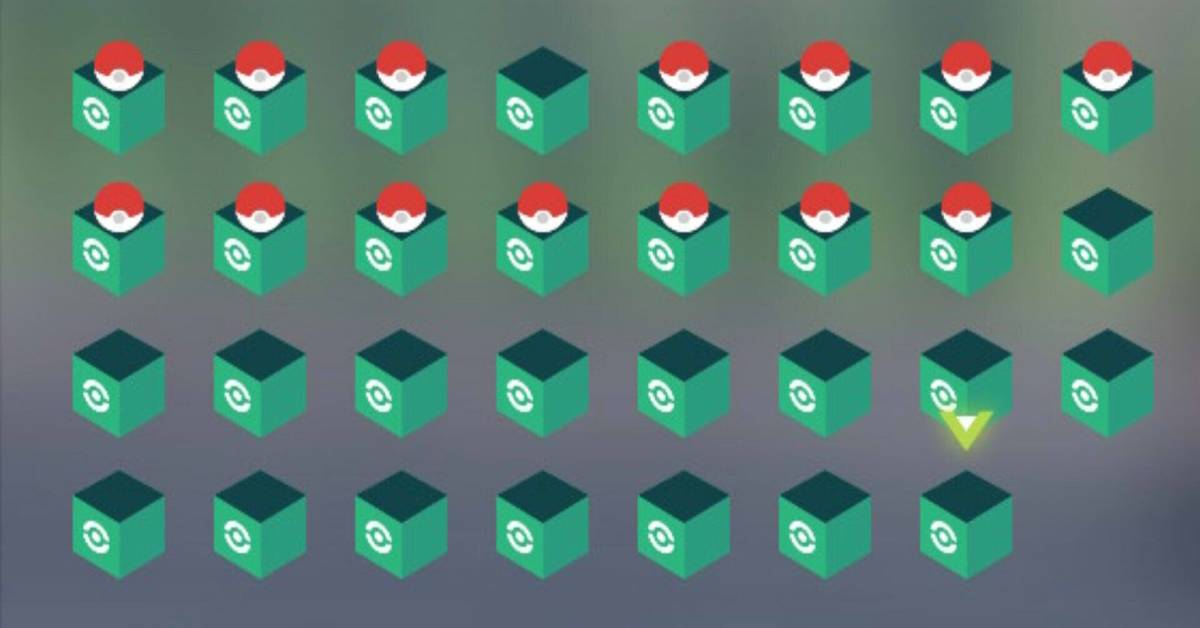
Now here’s the fun part. If you don’t feel like waiting for the game to naturally give you extra boxes, you can force it to unlock them faster using a simple trick that players discovered:
- Open the Boxes menu from the main screen.
- Drop at least one Pokémon into every available box.
- Once every box has something in it, exit the storage screen.
- Now reopen it – and boom, you’ll see new boxes added automatically.
You can repeat this process as many times as you want until you reach the max limit of 31 boxes. After that, you’re all set with more than enough space to store hundreds of Pokémon – from your first Ralts to that shiny Charizard you spent hours tracking down.
Tips to Keep Your Boxes Organized
If you’ve played long enough to fill 31 boxes, you already know it’s chaos in there. Here are a few small habits that make a huge difference when managing your Pokémon storage:
1. Group by Type or Purpose
Create your own little system – maybe one box for Fire-types, one for Legendaries, one for shinies, or one for competitive teams. Sorting like this saves time when you’re swapping Pokémon before a big fight.
2. Rearrange Boxes Easily
Hit the “+” button to see every box at once. You can press Y to swap entire boxes around if you want your favorites at the front or your “extras” tucked away in the back.
3. Move Multiple Pokémon at Once
Don’t waste time dragging one at a time. Hold ZL to select several Pokémon, then hit Y to pick them all up. Switch to another box and press A to drop them. Done.
4. Mass Release in One Go
Catching everything is fun until you realize half your boxes are full of level 12 Starlys. Highlight the ones you don’t need and press X to release them all together. It’s quick, clean, and makes room for your next batch of captures.
5. Use Search to Find Pokémon Fast
Press the “-” button to open the search feature. You can look up Pokémon by:
- Type
- Gender
- Nature
- Held Item
- Level
- Moves
This feature is super useful if you’re setting up for Z-A Royale matches or building a competitive team for online play.
Why Storage Management Actually Matters
It might seem like a small part of the game, but keeping your boxes organized can save you a lot of time later. When you’re hunting for the right Pokémon with a specific move or nature, a little order goes a long way.
Plus, Pokémon Legends: Z-A has a bigger focus on online play and battle formats than some past titles. Being able to quickly find and swap Pokémon for online battles, trading, or the new Z-A Royale mode can make a huge difference.
Also – let’s be real – it just feels nice having your shiny box lined up neatly.
Final Thoughts
Running out of box space in Pokémon Legends: Z-A can be frustrating, but thankfully, it’s one of the easiest problems to fix. Just fill what you have, leave the storage menu, and open it again – the game will handle the rest.
Keep doing this until you’ve unlocked all 31 boxes, and you’ll have enough room for every Pokémon you catch (and then some).
At that point, your only real challenge will be remembering where you put everything – but hey, that’s part of the fun. Keep catching, organizing, and building your dream team. After all, in Pokémon Legends: Z-A, there’s always one more Pokémon worth making room for.